
Travel Rule
What is the Travel Rule?
The Travel Rule is an international regulatory requirement, applied under the Markets in Crypto-Assets Regulation (MiCA) and the Transfer of Funds Regulation (TFR), that obliges crypto platforms (VASPs) to collect and share information about the sender and recipient when crypto is transferred between platforms or external wallets. It exists to increase transparency and help prevent money laundering and fraud.
The Travel Rule applies in both directions:
- Deposits: you may be asked to identify the sender before an incoming transfer is credited.
- Withdrawals: you may be asked to identify the recipient before funds are sent.
Who does the Travel Rule apply to?
The Travel Rule form appears for GoMining users who have a verified country of residence in the EEA and who:
- receive a deposit from a new external address, or
- withdraw funds to an external wallet.
If this applies to you, you'll be asked for a few extra details before the transfer can be completed.
Users outside the EEA are not affected.
Deposits: verifying the sender
When you receive crypto from an external address for the first time, the Travel Rule requires us to identify the sender before the funds can be credited. This is a one-time check per sender address, so future deposits from the same address are credited automatically without any extra steps.
You have 24 hours to verify the sender. If the time runs out, the deposit is not credited to your balance. To arrange a return of the funds to the sender, please contact our support team.
Where do I verify the sender?
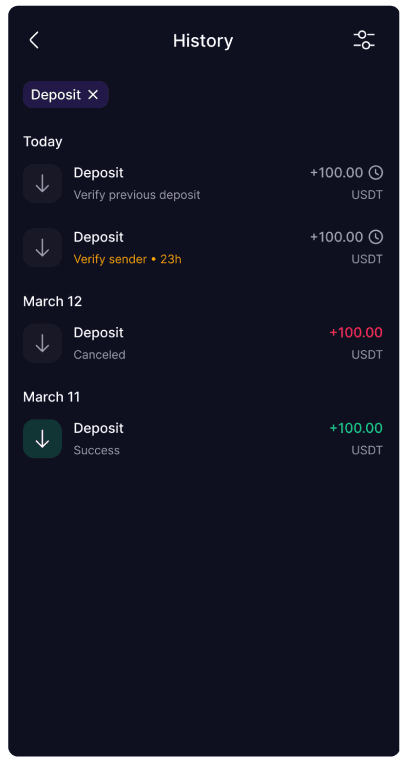
Go to History and find the deposit with a Verify sender status and a countdown:
Open it to see the Details screen with a Verify sender button and a live countdown timer:
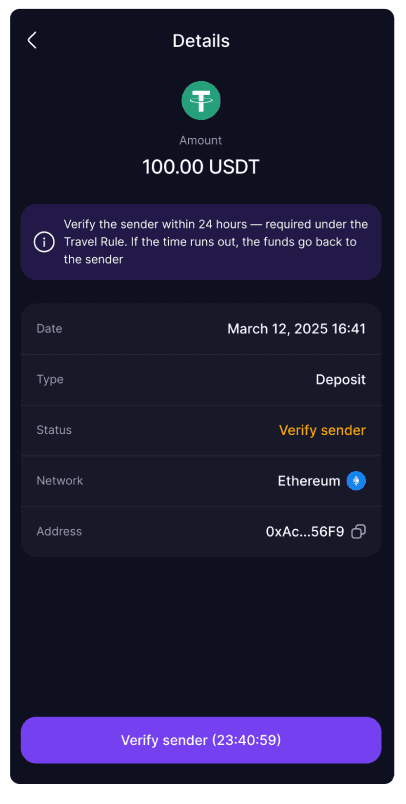
Tap Verify sender to open the form.
What information do I need to provide?
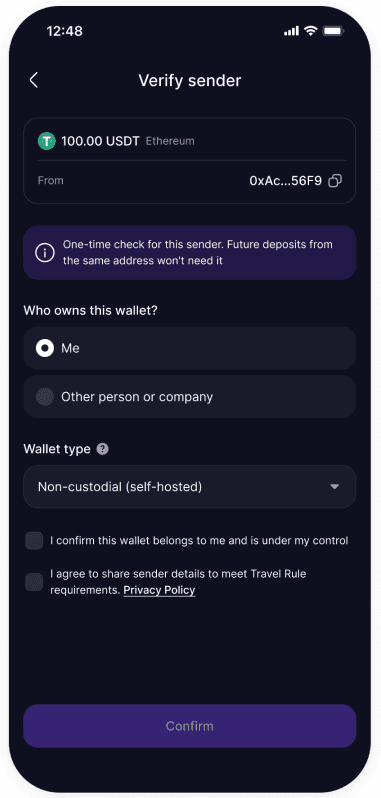
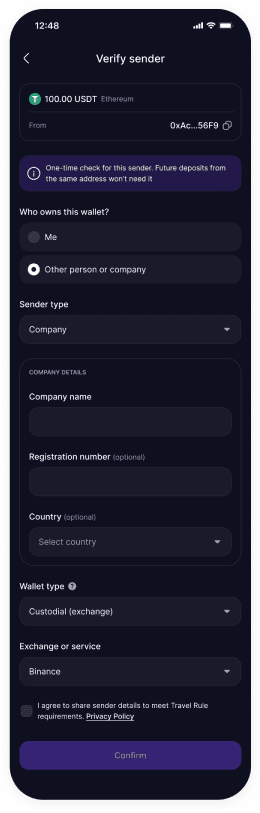
The form shows the incoming amount, network, and the sender's From address at the top, then asks:
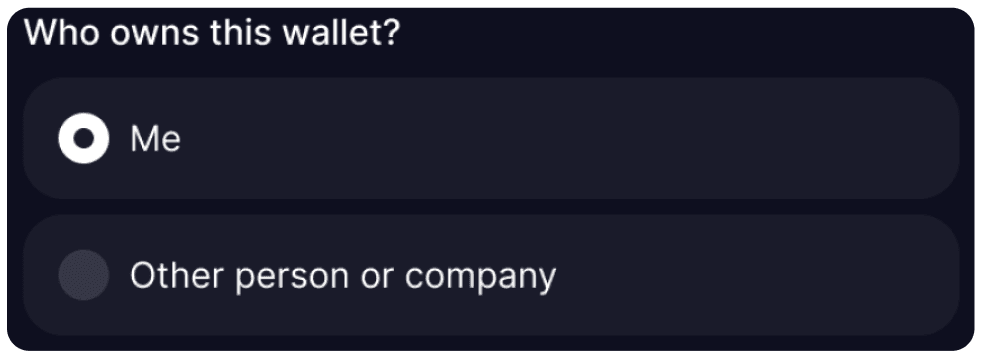
1. Who owns this wallet?
- Me: the deposit is coming from your own wallet.
- Other person or company: the funds were sent by a third party.
2. Sender type (only if Other person or company)
- Individual: full name, country, city, address line 1, and address line 2 (optional).
- Company: company name, registration number (optional), and country (optional).
3. Wallet type
- Custodial (exchange): the sending wallet is held by an exchange or service (e.g., Binance).
- Non-custodial (self-hosted): a wallet controlled directly by you or the sender (e.g., MetaMask).
4. Provider or self-confirmation (depends on the answers above)
- Custodial: choose the exchange or service the funds were sent from (e.g., Binance, Bybit, KuCoin).
- Non-custodial, sent from your own wallet: tick "I confirm this wallet belongs to me and is under my control."
- Non-custodial, sent by someone else: no provider applies; the sender is identified through the details from step 2.
5. Consent
Tick the box agreeing to share sender details to meet Travel Rule requirements, then tap Confirm.
What happens after I submit?
Your details are submitted, and the deposit is processed. Verification takes up to 10 minutes.
The deposit moves through these statuses:
- In progress: verification is running.
- Success: the sender is verified, and the funds are credited to your balance.
- Cancelled: the sender wasn't verified in time (or verification failed), so the deposit is not credited. To arrange a return of the funds to the sender, contact our support team.
What if I have more than one deposit to verify?
Deposits must be verified in order, starting with the earliest.
The 24-hour countdown runs independently for each deposit, starting from the moment it arrives, not from when its turn comes. If a deposit doesn't reach its turn within its own 24 hours, it will also expire and won't be credited. Verify pending deposits promptly, and contact our support team if you need more time.
Withdrawals: verifying the recipient
What information do I need to provide?
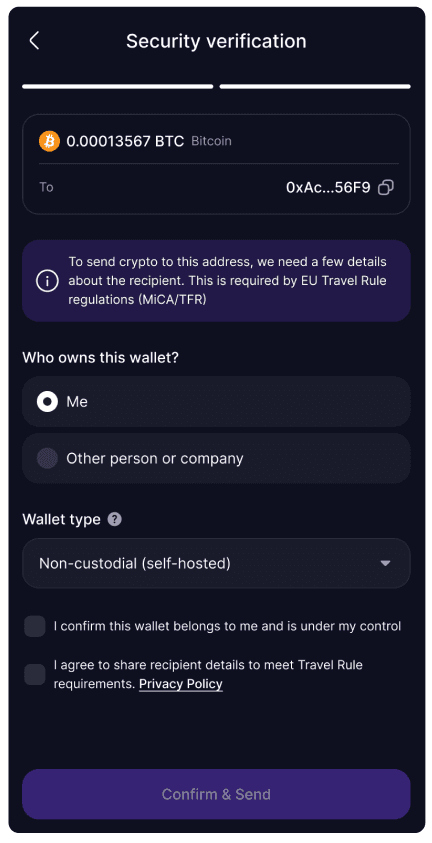
1. Who owns this wallet?
- Me (self-transfer): the destination wallet is your own.
- Other person or company: the wallet belongs to a third party.
2. Recipient (only if Other person or company)
Select the recipient type:
- Individual: full name, country, city, address line 1, and address line 2 (optional).
Why is the recipient's address requested?
The Travel Rule requires the recipient of a transfer to be identified, so their address used during KYC may be requested.
- Company: company name, registration number, and country (optional).
3. Wallet type
- Custodial (exchange / VASP): held by a platform or service (e.g., Binance).
- Non-custodial (self-hosted): a wallet you/the recipient control directly (e.g., MetaMask).
4. Provider or self-confirmation (depends on wallet type)
- Custodial: choose the provider (exchange) by searching the list (e.g., Binance, Bybit, KuCoin, Gemini, Crypto.com).
- Non-custodial, sending to your own wallet: self-confirm ownership by ticking that the wallet belongs to you and is under your control.
- Non-custodial, sending to someone else: no provider applies, so the recipient is identified through the recipient details from step 2 (Individual or Company) instead of a self-confirmation.
5. Consent
Tick the box agreeing to share recipient details to meet MiCA / TFR Travel Rule requirements before sending.
What happens after I submit?
The details are submitted for compliance verification. While this runs, the withdrawal amount is temporarily locked on your balance.
- If verification passes, the withdrawal is executed.
- If it does not pass, the funds are returned to your balance.
How long does verification take?
Verification usually takes a few seconds, but may take up to a few minutes in some cases.
Can I create multiple withdrawals at once?
No. Only one withdrawal can be processed at a time. After you submit a withdrawal, please wait until it is fully processed before starting a new one.
If you have an active withdrawal, you will need to wait for it to complete (either successfully or be cancelled) before initiating another.
Quick Q&A
Deposits
Why do I have to verify a deposit I received?
Under the Travel Rule, the receiving platform must identify who sent an incoming transfer. The first time you receive funds from a given external address, we ask you to confirm the sender.
It's a one-time check; later deposits from the same address are credited automatically.
What happens if I don't verify in time?
You have 24 hours to verify the sender.
If the countdown runs out, the deposit is not credited to your balance. To arrange a return of the funds to the sender, please contact our support team.
You would then need to arrange the transfer again.
What do I select if the deposit is from my own wallet?
Choose Me, then the wallet type:
- For a wallet on an exchange, select Custodial and pick the exchange or service.
- For a self-hosted wallet, select Non-custodial and tick "I confirm this wallet belongs to me and is under my control."
No name or address is requested when the sender is you.
What do I need if someone else sent me funds?
Choose Other person or company and the sender type:
- Individual: the sender's full name, country, city, and address.
- Company: the company name (registration number and country are optional).
Then select the wallet type the funds were sent from (and the exchange, if custodial).
I have several deposits waiting. Why can't I verify the newest first?
Deposits are verified in order, earliest first. Open the oldest pending deposit, verify it, and the next one becomes available. The Wallet banner shows how many are still waiting.
What if the sender's exchange is not in the list?
Search by exact name. If multiple regional variants appear, choose the one matching the service actually used by the sender. If the exchange is not in the list, please contact our support team before the countdown expires.
I don't know the sender's exact details. What should I do?
Enter the details as accurately as you can, based on who actually sent the funds. If you're unsure about a specific field, contact our support team before the countdown expires. If you can't identify the sender at all, don't complete the form; once the window passes, the deposit won't be credited, and you can contact support to arrange a return of the funds to the sender.
I'm not from the EEA but got a verification form. What should I do?
This shouldn't normally happen. Please contact our support team so we can look into your case and resolve the deposit.
Withdrawals
Are you sending it to yourself, to another person, or to a company?
This depends on who owns the wallet you're sending to:
- Yourself: if you're sending to your own wallet (e.g., your own Binance account, your own hardware wallet, your own MetaMask).
- Another person: if you're sending to a wallet that belongs to a friend, family member, or any other individual.
- Company: if you're sending to a business, service provider, or other legal entity.
Is the receiving wallet hosted or unhosted?
- Hosted wallet: a wallet on a centralized exchange or service that holds your funds for you. Examples: Binance, Coinbase, Kraken, Bitstamp, Bybit.
- Unhosted wallet: a wallet where you (or the recipient) personally hold the private keys. Examples: MetaMask, Trust Wallet, Ledger, Trezor, paper wallet.
If you're not sure, check whether you log in to a website to access the wallet (likely hosted) or use a browser extension / mobile app with a seed phrase (likely unhosted).
How do I choose the VASP (exchange/service provider)?
A VASP is the company that operates the wallet you're sending to, like Binance, Coinbase, or Kraken. Search by exact name in the list. If multiple similar names appear (e.g., regional variants), choose the one matching the service you actually use. If your VASP is not in the list, contact our support team. We may be able to add it, or there may be specific reasons why this destination isn't supported.
Whose name should I enter?
This field appears only when you're sending to another person or company. Enter the recipient's full name exactly as it appears on the receiving wallet or account. The name doesn't need to match your name in GoMining. What matters is that it matches the receiving wallet's account holder.
When you send to your own wallet, no name is requested; you only select the provider (for custodial wallets) or confirm ownership (for non-custodial wallets).
What address should I enter?
This field appears only when you're sending to another person or company. Enter the recipient's residential address, typically the one used during their KYC verification on the receiving service. This is required by regulation to identify the recipient, not the wallet address itself (the wallet address is captured separately).
When you send to your own wallet, no address is requested.
What happens if I make a mistake?
If verification doesn't pass, your withdrawal is cancelled, and your funds are returned to your balance. We recommend double-checking the recipient's name and details before submitting.
Common scenarios
Deposits
Example 1. Receiving from your own exchange account
Funds arrive from your personal account on a centralized exchange.
- Who owns this wallet?: Me
- Wallet type: Custodial
- Exchange or service: Select the exchange (e.g., Binance)
Example 2. Receiving from your own self-hosted wallet
Funds arrive from your own MetaMask, Trust Wallet, Ledger, etc.
- Who owns this wallet?: Me
- Wallet type: Non-custodial
- Tick "I confirm this wallet belongs to me and is under my control"
Example 3. Receiving from another person's exchange account
Someone else sent you funds from their exchange account.
- Who owns this wallet?: Other person or company
- Sender: Individual
- Sender details: Full name, Country, City, Address line 1, Address line 2 (optional)
- Wallet type: Custodial
- Exchange or service: Select the sender's exchange
Example 4. Receiving from another person's personal wallet
Someone sent you crypto from their MetaMask, Trust Wallet, Ledger, etc.
- Who owns this wallet?: Other person or company
- Sender: Individual
- Sender details: Full name, Country, City, Address line 1, Address line 2 (optional)
- Wallet type: Non-custodial
No exchange is needed; the sender is identified through the details above.
Example 5. Receiving from a company
A company sent you funds (e.g., a payout or refund).
- Who owns this wallet?: Other person or company
- Sender: Company
- Company details: Company name, Registration number (optional), Country (optional)
- Wallet type: Custodial or Non-custodial
- If Custodial: select the exchange or service
Withdrawals
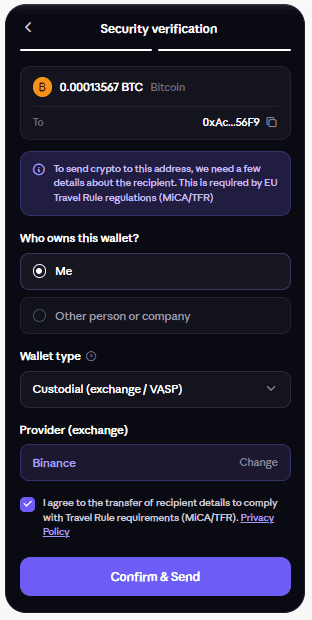
Example 1. Withdrawing to your own Binance account
You're sending crypto to your personal Binance account.
- Who owns this wallet?: Me
- Wallet type: Custodial
- Provider (VASP): Binance
This is treated as a transfer to yourself via a centralized exchange.
Example 2. Withdrawing to your own Bybit / Coinbase / Kraken account
You're sending funds to your own account on another exchange.
- Who owns this wallet?: Me
- Wallet type: Custodial
- Provider (VASP): select the relevant exchange
The process is the same as for Binance.
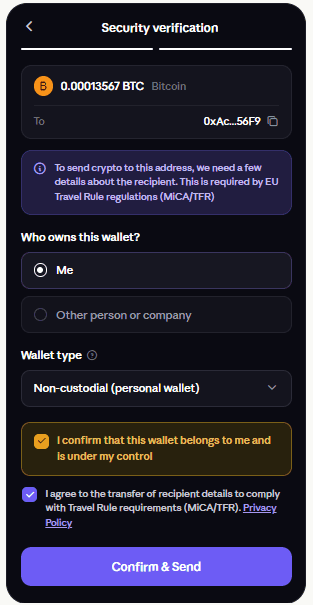
Example 3. Withdrawing to your own MetaMask
You're sending crypto to your own MetaMask wallet.
- Who owns this wallet?: Me
- Wallet type: Non-custodial
- Confirm that the wallet belongs to you and is under your control
Examples of such wallets: MetaMask, Trust Wallet, Rabby, Phantom, Ledger, Trezor.
No additional VASP needs to be specified.
Example 4. Withdrawing to another person's exchange account
You're sending funds to someone else's account on a centralized exchange.
- Who owns this wallet?: Other person or company
- Recipient: Individual
- Recipient details: Full name, Country, City, Address line 1, Address line 2 (optional)
- Wallet type: Custodial
- Provider (exchange): Select the recipient's exchange
Example 5. Withdrawing to another person's personal wallet
You're sending crypto to another person's MetaMask, Trust Wallet, Ledger, etc.
- Who owns this wallet?: Other person or company
- Recipient: Individual
- Recipient details: Full name, Country, City, Address line 1, Address line 2 (optional)
- Wallet type: Non-custodial
No provider is needed; the recipient is identified through the details above.
Example 6. Withdrawing to a company
You're sending funds to a company (e.g., paying an invoice).
- Who owns this wallet?: Other person or company
- Recipient: Company
- Company details: Company name, Registration number (optional), Country (optional)
- Wallet type: Custodial or Non-custodial
- If Custodial: select the provider (exchange)